Used by 100s of Content Creators

Never Lose Track During
Your Best Presentations

Professional countdown timer, teleprompter, and visual cues designed for content creators, streamers, and presenters. Stay on time, every time.
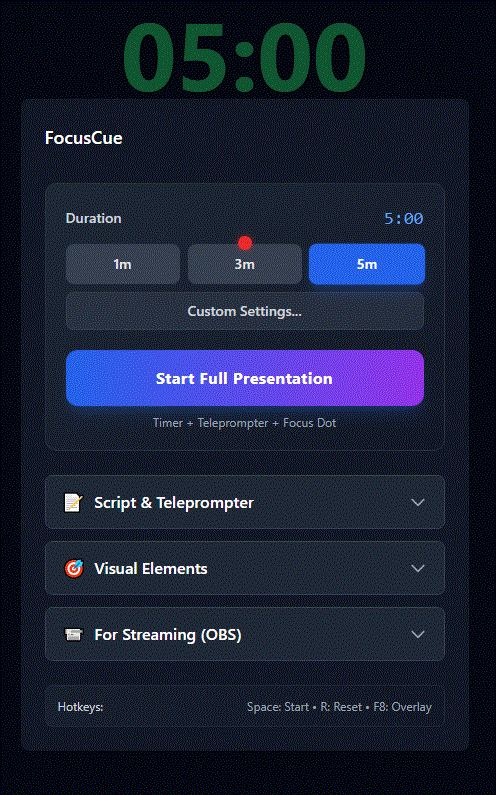
FocusCue Interface Demo
OBS Ready

How It Works

Get started in 3 simple steps

1

Set Your Timer & Script

Choose your presentation duration (up to 5 minutes free) and add your teleprompter script. Adjust settings like warning thresholds and focal dot position.

2

Click "Start Presentation"

One button starts both your countdown timer and teleprompter. The focal dot appears to help maintain eye contact with your camera or audience.

3

Present Like a Pro

Watch the timer change from green to amber to red as time passes. Your script scrolls automatically or step-by-step. Stay on track, every time.

Start (Green)
Warning (Amber)
Time Up (Red)

Everything You Need to Present Like a Pro

⏱️

Smart Countdown Timer

Color-coded thresholds (green → amber → red) keep you aware of time without checking the clock.

📝

Built-in Teleprompter

Smooth scrolling or step-by-step mode. Never forget your talking points again.

🔴

Focal Dot System

Adjustable red dot helps maintain eye contact with your camera for engaging presentations.

🎬

OBS Integration

Add as browser source to OBS Studio. Perfect for live streaming and recordings.

⌨️

Global Hotkeys

Control everything with keyboard shortcuts. Start, stop, reset without touching the mouse.

💾

Save Presets

Save your scripts and timer settings. Load them instantly for consistent presentations.

Simple, Fair Pricing

Start free, upgrade when you need more

Free

Perfect for short presentations

$0 forever
  • Timer up to 5 minutes
  • Full teleprompter features
  • Adjustable focal dot
  • OBS browser source
  • Keyboard shortcuts
Start Free
BEST VALUE

Pro

For serious presenters

$12 / £12

One-time payment

  • Unlimited timer duration
  • All free features included
  • 10, 15, 20+ minute presets
  • Perfect for webinars & streams
  • No subscription - pay once
Upgrade in App

Secure payment via Stripe. No account required.

Loved by Content Creators

"FocusCue transformed my presentations. The timer keeps me on track and the teleprompter is a lifesaver!"

Verified User

YouTuber

"The OBS integration is seamless. My streams look so much more professional now!"

Verified User

Twitch Streamer

"Worth every penny! The focal dot feature alone improved my eye contact dramatically."

Verified User

Course Creator

Frequently Asked Questions

What features does FocusCue include?

FocusCue includes professional countdown timers, teleprompter with auto-scroll and step modes, adjustable focus dot, OBS browser source integration, keyboard shortcuts, and auto-saving settings. The free version supports timers up to 5 minutes. Upgrade to Pro for unlimited timer duration.

Is FocusCue free? What does Pro include?

Yes! The free version includes all features with a 5-minute timer limit. Upgrade to FocusCue Pro for just $12/£12 (one-time payment) to unlock unlimited timer duration - perfect for longer presentations, webinars, and streams. No subscriptions, no hidden fees.

Does it work with OBS Studio?

Absolutely! FocusCue works perfectly with OBS Studio. Simply add it as a browser source using the provided URL and enable transparent background.

What operating systems are supported?

FocusCue is web-based and works on any OS with a modern browser - Windows, Mac, Linux, ChromeOS, and even mobile devices.

Do I need to create an account?

No account needed! FocusCue works directly in your browser. Your settings and teleprompter scripts are saved locally on your device for privacy and convenience.

Ready to Level Up Your Presentations?

Join 100s of content creators using FocusCue

🍪 We value your privacy

Your scripts and settings stay in your browser. We use essential cookies and optional anonymous analytics. Learn more